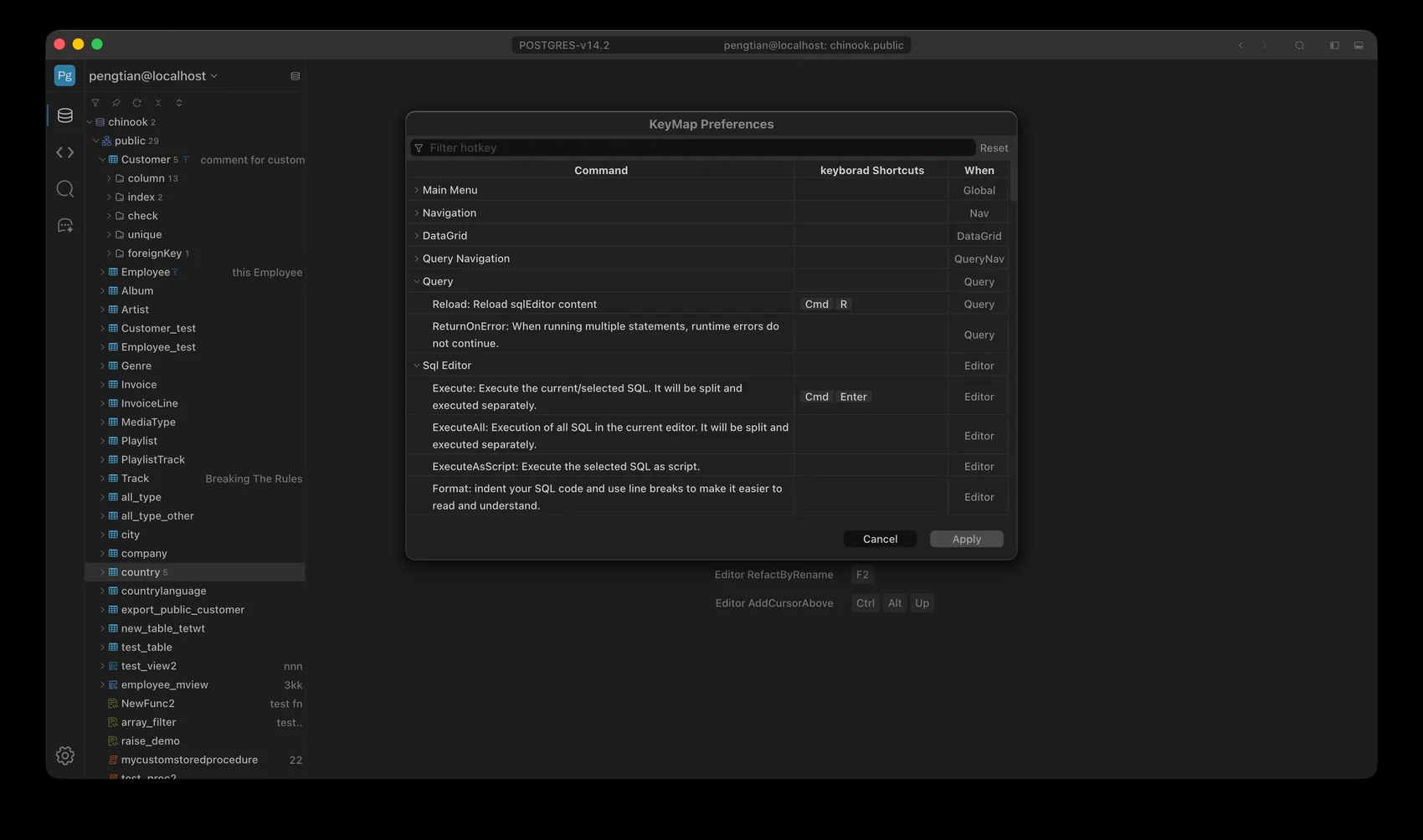
| Execute: Execute the current/selected SQL. It will be split and executed separately. | ⌘ENTER | Ctrl+ENTER |
| aiChat: show inline AI Chat on the current cursor position. | ⌘I | Ctrl+I |
| SmartHit: Hold Key and hover to view SQL syntax hints and help information | ⌘ | Ctrl |
| RefactByRename: Rename the selected token and simultaneously update all identical ones within the current SQL statement. | F2 | F2 |
| AddCursorAbove: Adds a cursor above the current cursor position. | ⌃⌥UP | Ctrl+Alt+UP |
| AddCursorAboveSkipCurrent: Adds a cursor above the current cursor position while skipping the current cursor. | ⌃⌥⇧UP | Ctrl+Alt+Shift+UP |
| AddCursorBelow: Adds a cursor below the current cursor position. | ⌃⌥DOWN | Ctrl+Alt+DOWN |
| AddCursorBelowSkipCurrent: Adds a cursor below the current cursor position while skipping the current cursor. | ⌃⌥⇧DOWN | Ctrl+Alt+Shift+DOWN |
| AlignCursors: Aligns multiple cursors or selections. | ⌃⌥A | Ctrl+Alt+A |
| Backspace: Deletes the character before the cursor or selected text. | ⌃BACKSPACE|SHIFTBACKSPACE|BACKSPACE|CTRLH | Shift+BACKSPACE|BACKSPACE |
| BlockIndent: Indents a block of code or selected lines. | ⌃] | Ctrl+] |
| BlockOutdent: Outdents (removes indentation) a block of code or selected lines. | ⌃[ | Ctrl+[ |
| CenterSelection: Centers the current selection or cursor position. | ⌃L | “ |
| CopyLinesDown: Copies the current line or selected lines and pastes them below. | ⌘⌥DOWN | Alt+Shift+DOWN |
| CopyLinesUp: Copies the current line or selected lines and pastes them above. | ⌘⌥UP | Alt+Shift+UP |
| Del: Deletes the character at the cursor or selected text. | DELETE|CTRLD|SHIFTDELETE | DELETE |
| DuplicateSelection: Creates a duplicate of the current selection or line. | ⌘⇧D | Ctrl+Shift+D |
| ExpandToMatching: Expands the selection to the matching opening or closing character, such as parentheses or brackets. | ⌃⇧M | Ctrl+Shift+M |
| ExpandToLine: Expands the current selection to the entire line. | ⌘⇧L | Ctrl+Shift+L |
| Find: Opens a search dialog to find text in the document. | ⌘F | Ctrl+F |
| FindAll: Finds all occurrences of a search term in the document. | ⌃⌥G | Ctrl+Alt+K |
| FindNext: Finds the next occurrence of the last search term. | ⌘G | Ctrl+K |
| FindPrevious: Finds the previous occurrence of the last search term. | ⌘⇧G | Ctrl+Shift+K |
| Fold: Folds (hides) a block of code or text. | ⌘⌥L|CMDF1 | Alt+L|CTRL+F1 |
| FoldOther: Folds all other blocks of code except the current block. | ⌘⌥0 | Alt+0 |
| FoldAll: Folds all blocks of code or text in the document. | ⌃⌘⌥0 | “ |
| GoLineDown: Moves the cursor down one line. | DOWN|CTRLN | DOWN |
| GoLineUp: Moves the cursor up one line. | UP|CTRLP | UP |
| GoToEnd: Moves the cursor to the end of the document or line. | ⌘END|CMDDOWN | Ctrl+END |
| GoToLeft: Moves the cursor to the left. | LEFT|CTRLB | LEFT |
| GoToLine: Moves the cursor to a specific line number. | ⌘L | Ctrl+L |
| GoToLineEnd: Moves the cursor to the end of the current line. | ⌘RIGHT|END|CTRLE | Alt+RIGHT|END |
| GoToLineStart: Moves the cursor to the start of the current line. | ⌘LEFT|HOME|CTRLA | Alt+LEFT|HOME |
| GoToPageDown: Moves the cursor down one page. | PAGEDOWN|CTRLV | PAGEDOWN |
| GoToRight: Moves the cursor to the right. | RIGHT|CTRLF | RIGHT |
| GoToStart: Moves the cursor to the start of the document or line. | ⌘HOME|CMDUP | Ctrl+HOME |
| GoToWordLeft: Moves the cursor to the left by word. | ⌥LEFT | Ctrl+LEFT |
| GoToWordRight: Moves the cursor to the right by word. | ⌥RIGHT | Ctrl+RIGHT |
| Indent: Indents the current line or selected lines. | TAB | TAB |
| JumpToMatching: Jumps the cursor to the matching opening or closing character. | ⌃P | Ctrl+P |
| ModifyNumberDown: Decreases the value of the selected number or the number at the cursor. | ⌥⇧DOWN | Ctrl+Shift+DOWN |
| ModifyNumberUp: Increases the value of the selected number or the number at the cursor. | ⌥⇧UP | Ctrl+Shift+UP |
| MoveLinesDown: Moves the current line or selected lines down. | ⌥DOWN | Alt+DOWN |
| MoveLinesUp: Moves the current line or selected lines up. | ⌥UP | Alt+UP |
| Outdent: Outdents (removes indentation) the current line or selected lines. | ⇧TAB | Shift+TAB |
| PageDown: Scrolls the document down one page. | ⌥PAGEDOWN | “ |
| PageUp: Scrolls the document up one page. | ⌥PAGEUP | “ |
| Redo: Redoes the last undone action. | ⌘⇧Z|CMDY | Ctrl+Shift+Z|CTRL+Y |
| RemoveLine: Deletes the current line or selected lines. | ⌘D | Ctrl+D |
| RemoveToLineEnd: Deletes from the cursor to the end of the line. | ⌃K|CMDDELETE | Alt+DELETE |
| RemoveToLineEndHard: Deletes from the cursor to the end of the line, including the newline character. | “ | Ctrl+Shift+DELETE |
| RemoveToLineStart: Deletes from the cursor to the start of the line. | ⌘BACKSPACE | Alt+BACKSPACE |
| RemoveToLineStartHard: Deletes from the cursor to the start of the line, including the newline character. | “ | Ctrl+Shift+BACKSPACE |
| RemoveWordLeft: Deletes the word to the left of the cursor. | ⌥BACKSPACE|CTRL⌥BACKSPACE | Ctrl+BACKSPACE |
| RemoveWordRight: Deletes the word to the right of the cursor. | ⌥DELETE | Ctrl+DELETE |
| Replace: Opens a dialog to search and replace text in the document. | ⌘⌥F | Ctrl+H |
| ReplayMacro: Replays a recorded macro. | ⌘⇧E | Ctrl+Shift+E |
| ScrollDown: Scrolls the document down. | “ | Ctrl+DOWN |
| ScrollUp: Scrolls the document up. | “ | Ctrl+UP |
| SelectMoreAfter: Extends the selection to the next occurrence after the current selection. | ⌃⌥RIGHT | Ctrl+Alt+RIGHT |
| SelectMoreBefore: Extends the selection to the next occurrence before the current selection. | ⌃⌥LEFT | Ctrl+Alt+LEFT |
| SelectNextAfter: Selects the next occurrence after the current selection. | ⌃⌥⇧RIGHT | Ctrl+Alt+Shift+RIGHT |
| SelectNextBefore: Selects the next occurrence before the current selection. | ⌃⌥⇧LEFT | Ctrl+Alt+Shift+LEFT |
| SelectOrFindNext: Selects the next occurrence or finds the next occurrence of the last search term. | ⌃G | Alt+K |
| SelectOrFindPrevious: Selects the previous occurrence or finds the previous occurrence of the last search term. | ⌃⇧G | Alt+Shift+K |
| SelectAll: Selects the entire document. | ⌘A | Ctrl+A |
| SelectDown: Moves the selection down one line. | ⇧DOWN|CTRL⇧N | Shift+DOWN |
| SelectLeft: Moves the selection to the left. | ⇧LEFT|CTRL⇧B | Shift+LEFT |
| SelectRight: Moves the selection to the right. | ⇧RIGHT | Shift+RIGHT |
| SelectToEnd: Selects from the cursor to the end of the document or line. | ⌘⇧END|CMD⇧DOWN | Ctrl+Shift+END |
| SelectToLineEnd: Selects from the cursor to the end of the line. | ⌘⇧RIGHT|SHIFTEND|CTRL⇧E | Alt+Shift+RIGHT |
| SelectToLineStart: Selects from the cursor to the start of the line. | ⌘⇧LEFT|CTRL⇧A | Alt+Shift+LEFT |
| SelectToMatching: Selects from the cursor to the matching opening or closing character. | ⌃⌥P | Ctrl+Alt+P |
| SelectToStart: Selects from the cursor to the start of the document or line. | ⌘⇧HOME|CMD⇧UP | Ctrl+Shift+HOME |
| SelectUp: Moves the selection up one line. | ⇧UP|CTRL⌥P | Shift+UP |
| SelectWordLeft: Selects the word to the left of the cursor. | ⌥⇧LEFT | Ctrl+Shift+LEFT |
| SelectWordRight: Selects the word to the right of the cursor. | ⌥⇧RIGHT | Ctrl+Shift+RIGHT |
| ShowAutoCompleteWindow: Shows the complete window. | ⌘SPACE | Ctrl+SPACE |
| SortLines: Sorts the selected lines or lines in the document. | ⌘⌥S | Ctrl+Alt+S |
| SplitIntoLines: Splits the selected text into multiple lines. | ⌃⌥L | Ctrl+Alt+L |
| SplitLine: Splits the current line at the cursor position. | ⌃O | “ |
| ToggleBlockComment: Toggles comment/uncomment for a block of code or selected lines. | ⌘⇧/ | Ctrl+Shift+/ |
| ToggleFoldWidget: Toggles the folding of a code block or region. | ⌘⌥[ | Ctrl+Shift+[ |
| ToggleParentFoldWidget: Toggles the folding of the parent code block or region. | ⌘⌥] | Ctrl+Shift+] |
| ToggleComment: Toggles comment/uncomment for the current line or selected lines. | ⌘/ | Ctrl+/ |
| ToLowerCase: Converts the selected text or text at the cursor to lowercase. | ⌃⇧U | Ctrl+Shift+U |
| ToUpperCase: Converts the selected text or text at the cursor to uppercase. | ⌃U | Ctrl+U |
| TransposeLetters: Transposes (swaps) the characters at the cursor with the characters to the right. | ⌃T | Alt+Shift+X |
| Undo: Undoes the last action. | ⌘Z | Ctrl+Z |
| Unfold: Unfolds (reveals) a folded block of code or text. | ⌘⌥⇧L|CMD⇧F1 | Alt+Shift+L|CTRL+Shift+F1 |
| UnfoldAll: Unfolds (reveals) all folded blocks of code or text in the document. | ⌘⌥⇧0 | Alt+Shift+0 |